Introduction
MagFEM solves two-dimensional magnetic field problems with the finite element method, right in the browser. It is meant for inductors, transformers, actuators, contactors and, later, rotating machines. Problems can be planar (a cross-section with a depth) or axisymmetric (solids of revolution around the z axis).
No installation and no server. The numerical core (C++ and Eigen) is compiled to WebAssembly and runs in a Web Worker. Your project stays on your machine, as in draw.io.
English and Portuguese, light and dark themes, and the Cite button at the top.
Open it at https://thalesmaia.com/tools/magfem-web/. It works best in Chrome or Edge, which can save straight to the same file; in Firefox and Safari, saving becomes a download.
The workflow
The tree on the left follows the order of the work, as in COMSOL:
Geometry — the parametric drawing (entities, constraints, dimensions and variables).
Mesh — region materials, circuits, boundaries, element size and the mesh.
Solver — the physics (magnetic field or circuit) and the analysis type.
Results — field views, plots and tables, each one in a canvas tab.
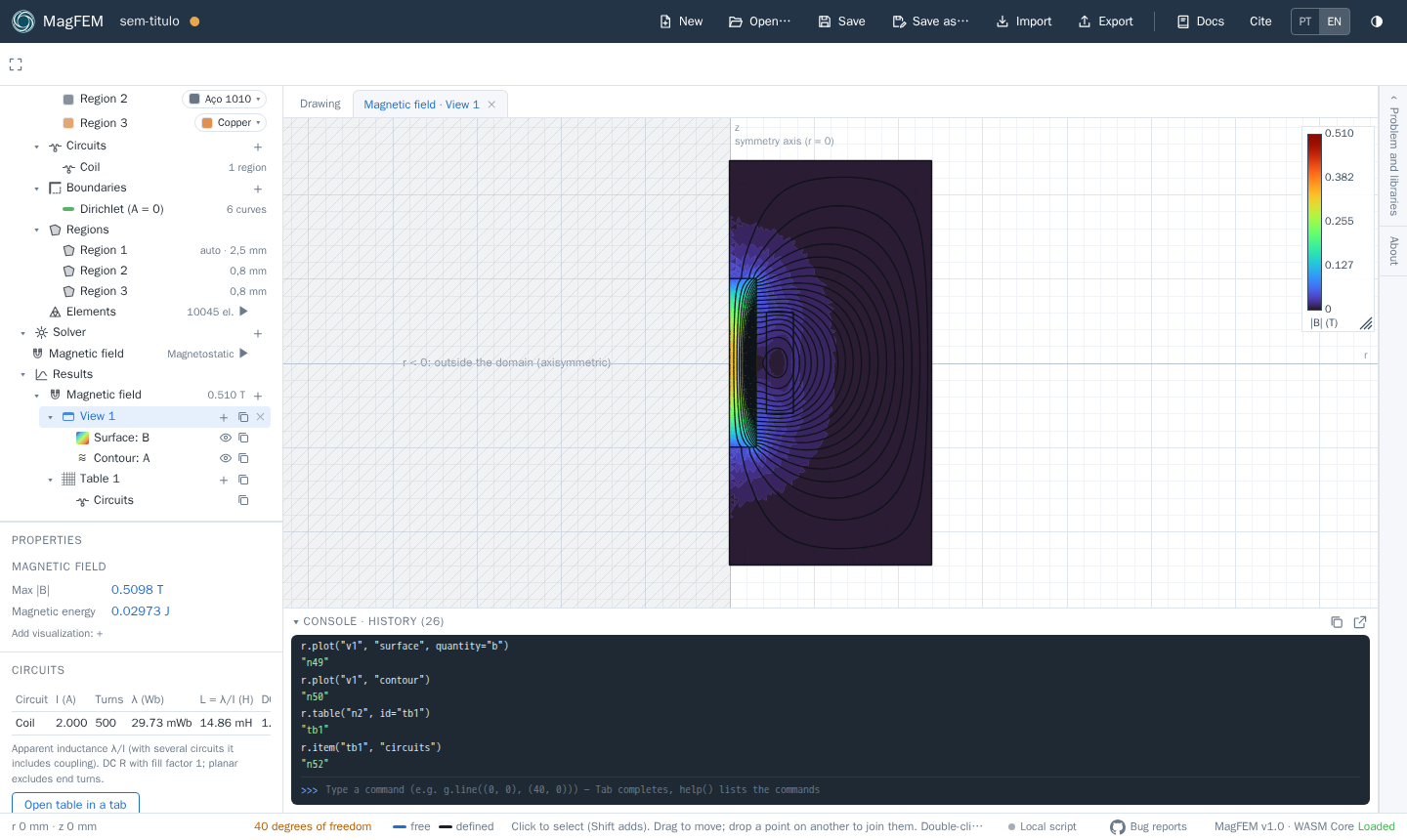
The interface
Area |
Contents |
|---|---|
Top bar |
New, Open, Save, Save as, Import, Export, Cite, language (PT/EN) and theme |
Toolbar |
drawing, constraints, dimension and editing (trim, offset, mirror, patterns), move and group |
Model tree |
the four stages; each node’s |
Properties |
below the tree: the properties of the selection |
Canvas |
the drawing and the result tabs (views, plots, tables, schematic) |
Right drawer |
Problem and libraries: unit, planar/axisymmetric, depth, materials and boundaries |
Console |
every action shows up as an API command; typed commands work too |
Status bar |
coordinates, degrees of freedom, hints, Local script, Bug reports and the version |
Next steps
Build the first model: an axisymmetric coil with a steel core, from the drawing to the inductance.
Learn how to draw and constrain the geometry.
Automate with the console and the local bridge.